- PHP 54.2%
- JavaScript 25.2%
- Vue 20.6%
| Filename | Latest commit message | Latest commit date |
|---|---|---|
|
|
||
| .tx | ||
| appinfo | ||
| composer | ||
| l10n | ||
| lib | ||
| screenshots | ||
| src | ||
| templates/settings | ||
| .gitignore | ||
| .l10nignore | ||
| .nextcloudignore | ||
| CHANGELOG.md | ||
| composer.json | ||
| composer.lock | ||
| krankerl.toml | ||
| LICENSE | ||
| package-lock.json | ||
| package.json | ||
| README.md | ||
| renovate.json | ||
| webpack.config.js | ||



Organization Folders
The Organization Folders Nextcloud app is a new way to manage Team Folders (formerly known as group folders) and the permissions within them, designed for large organizations.
Features
- ✨ No need to create any ACL rules manually anymore
- 🔐 Fine-grained management rights delegation support
- 🔧 Management in the web interface and using occ commands
- 🏢 Support for adding your organizations structure/hierarchy, to allow roles within them to be picked in a structured and intuitive way
Screenshots
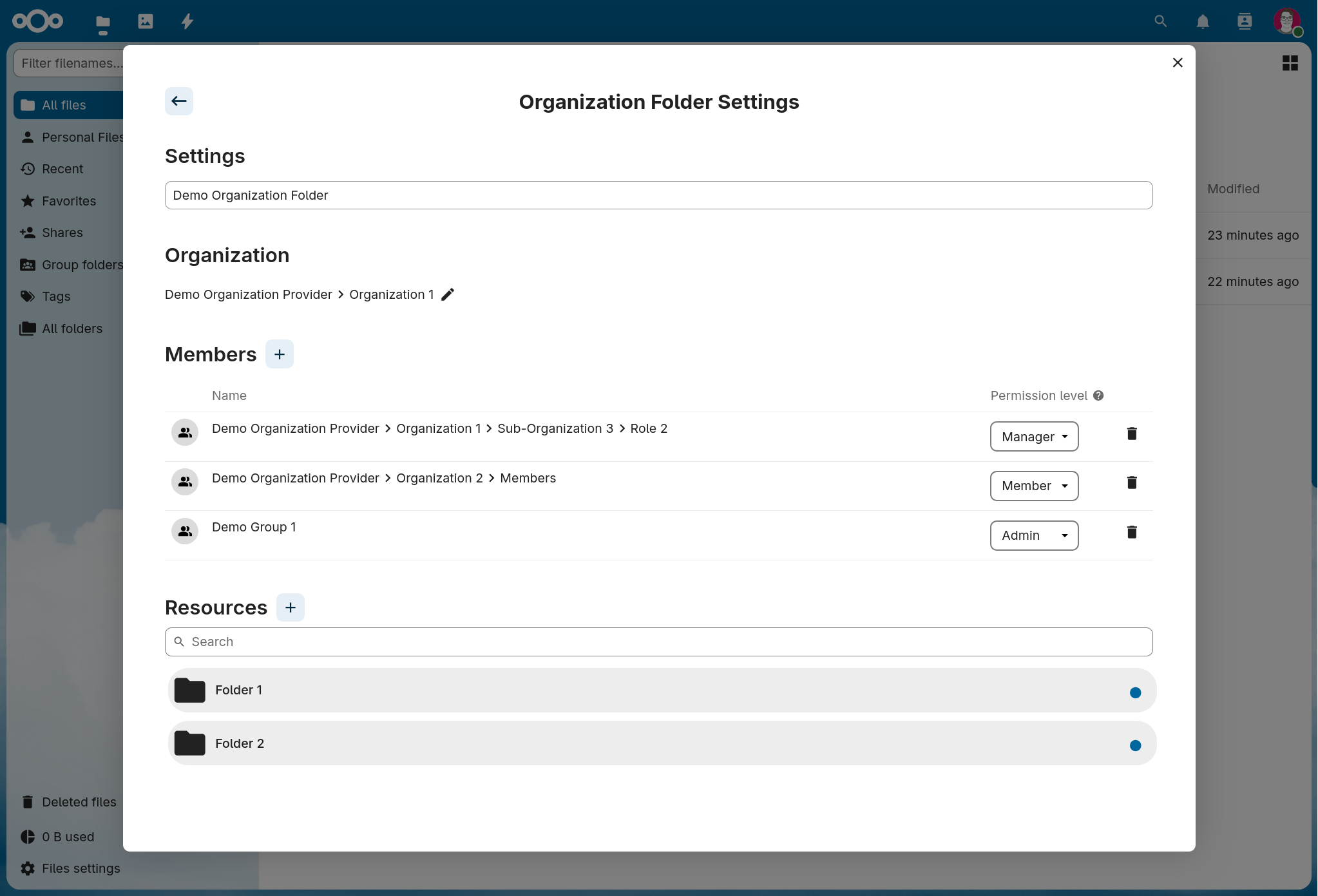
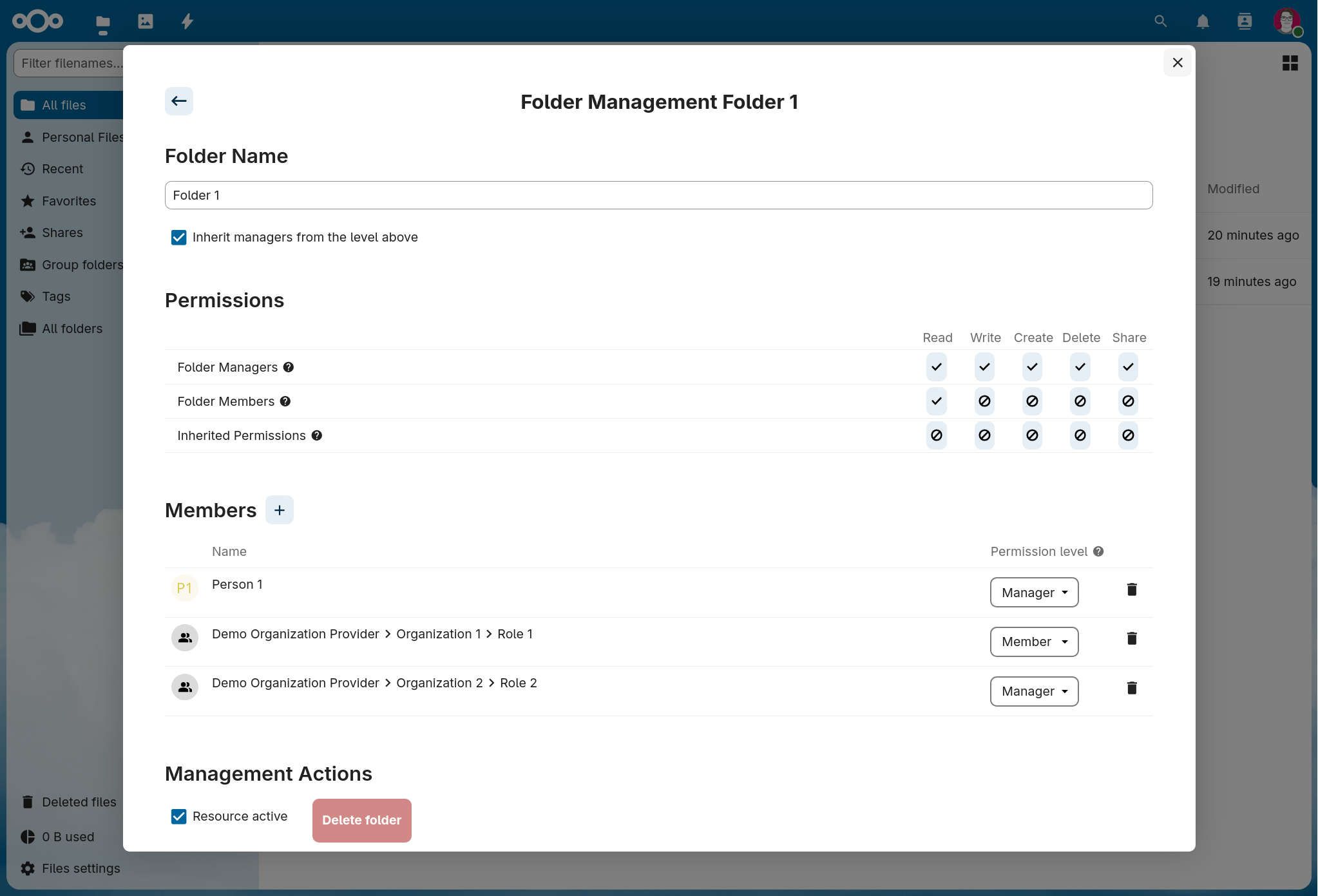
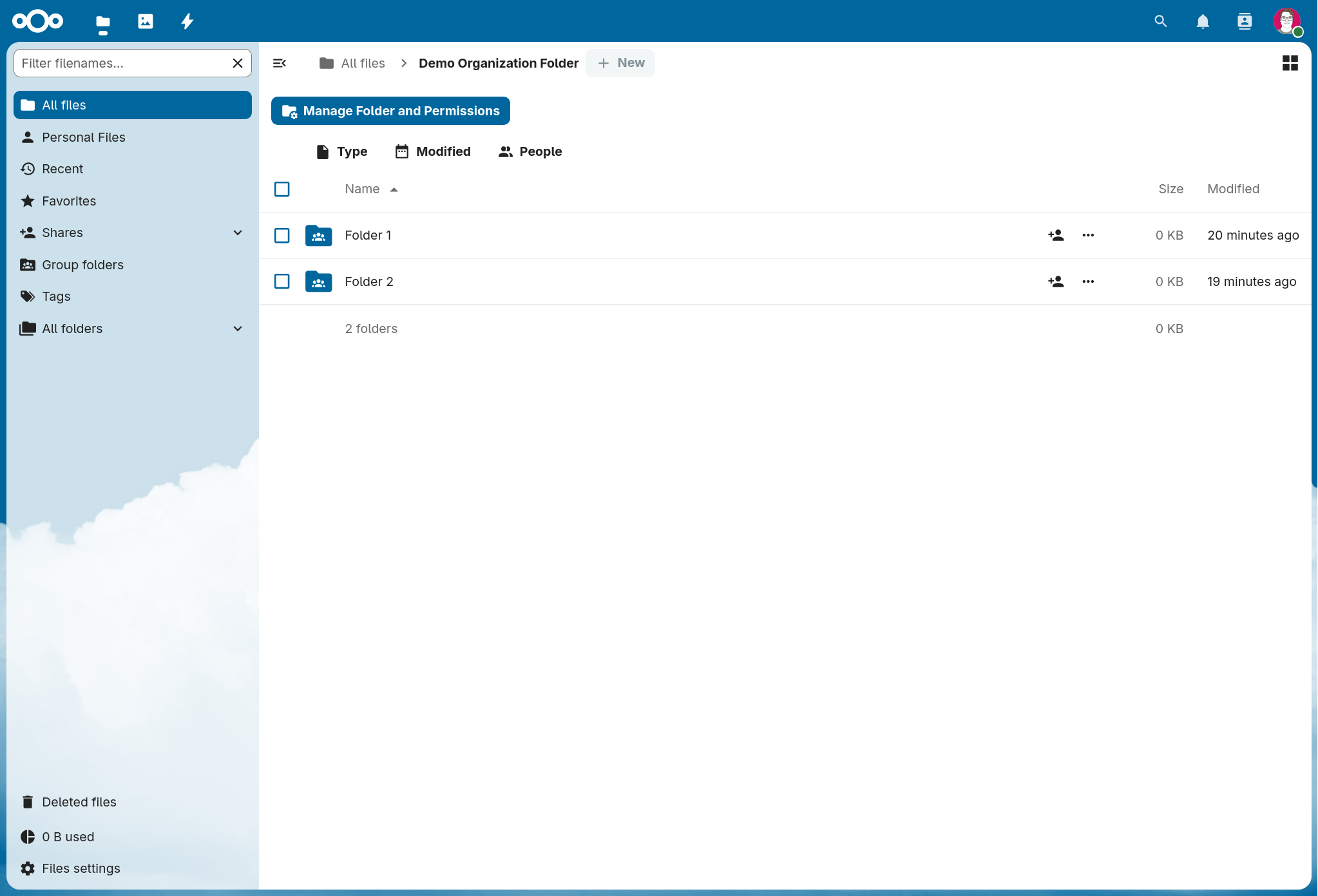
How it works
- Organization Folders are Team Folders managed by this app
- Team Folders created outside this app cannot be managed with it
- Do not make changes to Organization Folders through the Team Folders admin settings or ACL settings sidebar, they will be overwritten!
- Within Organization Folders, there are Resources
- Currently the only type of resource is folders, but there may be others in the future (like calendars)
- Resources can be nested within other folder resources (unless that feaure is disabled, see here)
- Organization Folders have Members
- These are the groups and roles (more on that later), that can can see the folder
- Each of them has a permission level (Member, Manager or Admin)
- Resources have Members too
- These are groups, roles or individual users with specific rights in that resource
- Each of them has a permission level (Member or Manager)
- Managers can change the settings of the resource
- In each resource you can choose if managers from the level above (for top level resources that is the organization folder, otherwise it's the parent resource) should be inherited and also have management access to the resource
- Admin members in the organization folder are not subject to this inheritance setting, they have full management rights within all resources of the Organization Folder
- Nextcloud instance admins have management permissions in every resource of every organization folder regardless of the inheritance setting
- Nextcloud admins, unlike organization folder admins do not see the organization folder in the filesystem. Instead they see the "Manage Folder and Permissions" button in their home folder too instead in organization folders only, which when clicked shows a list of all organization folders, which allows them to open the management UI for any organization folder.
- Folder/File rights:
- For resources of the type folder you can choose for each permission level the rights people within them should have inside that folder: Read, Write, Create, Delete and Share
- Additionally you can choose which rights people with at least read access to the folder level above (for top level resources that is the organization folder, otherwise it's the parent resource) should have within the folder
- This permissions model is intentionally limited compared to raw ACLs, to make it easy to understand the current permissions configuration and easy to ensure at a glance, that the permissions are correctly configured.
- We believe this permissions model still allows you to configure most permissions structures commonly used in groupfolders, while being much simpler to use than ACLs
- You can create regular folders within folder resources (not at the top-level of an organization folder though), these are called "unmanaged" folders, because all file rights for them are inherited from the nearest parent resource
- The system that gives Organization Folders it's name: Organizations and Suborganizations allow you to model your entire organizations hierarchy/structure (perfect for highly distributed organizations like political parties with local chapters)
- Each (sub)organization can have Roles
- Roles are assigned to users, if they are assigned to a specific function or have a certain permission in that organization
- Users have a role, if they are assigned to the specific nextcloud group it is backed by
- The management of these role assignments is currently out of scope of this app. It is expected, that you connect your nextcloud instance to your organization members database (for example using https://github.com/nextcloud/user_saml/ or a custom group backend) or are manually assigning users to nextcloud groups
- The structure of your organization must be provided to this app using a programmatic interface, by creating a small companion app, that registers itself as an organization provider. It can pull data from your organizations member database or just return hardcoded values. An example implementation returning hardcoded values can be found here. NOTE: This API is not yet in the Public namespace, meaning no API interface stability guarantees are made between app versions, for progress see #74.
- The usage of this system is entirely optional. The app works fine without any registered organization provider. But all members will then be individual users or regular nextcloud groups, which are unstructured and therefore not easy to work with in very large organizations.
- If you use a filesystem with snapshot capabilities, Organization Folders can be integrated with it to offer a self-service restore-from-backups UI to folder resource managers.
- Resources can be created from templates, which are defined using a programmatic interface similar to the organization system.
How to install
- Install the Team folders app from the nextcloud app store
- Install the Groupfolder Tags app from the nextcloud app store
- (OPTIONAL) Install and configure the Groupfolder Filesystem Snapshots app from the nextcloud app store
- Install this app from the nextcloud app store
How to Use
- Open the files app.
- If you are a Nextcloud admin, you will see a management button above your file list in the home folder.
- Click the management button to open the Organization Folder management modal.
- In the modal, you can create your first Organization Folder.
- Once created, you can add members and resources to the Organization Folder.
- When navigating to a folder whose permissions are managed by this app, the management button will also appear — if you are a Nextcloud admin or have management permissions for that Organization Folder or Resource.
- Use the modal to configure the Resource permissions as needed.
Config options
-
Per default sub-resources are enabled. To disable the ability of users to create nested resources run:
occ config:app:set --type boolean --value false organization_folders subresources_enabled -
By default the groups from the group backend of this app (named "ORGANIZATION_FOLDER_*"), that are used to invite individual users to groupfolders can also be selected by users like regular groups (for example when sharing a file). This is probably unwanted and you can hide them from users with this setting.
occ config:app:set --type boolean --value true organization_folders hide_virtual_groupsATTENTION: This intentionally makes the group backend behave in a way that is non-conformant in order for the groups to still be useable by groupfolders, but not searchable by users. If this causes any issues for your instance turn this setting off again (but no such issues are currently known to the developers).